
1、微信公众号多域名回调功能:微信公众号后台默认只能授权2个网页域名,用本系统突破这个限制,用同一个公众号对接无限多个网站。网站后台支持回调域名白名单的管理,以及登录记录的查看。
2、微信access_token获取功能:可让本系统作为中控服务器统一获取和刷新access_token,其他业务逻辑站点所使用的access_token均调用当前站点获取,这样可避免各自刷新造成冲突,导致access_token覆盖而影响业务。
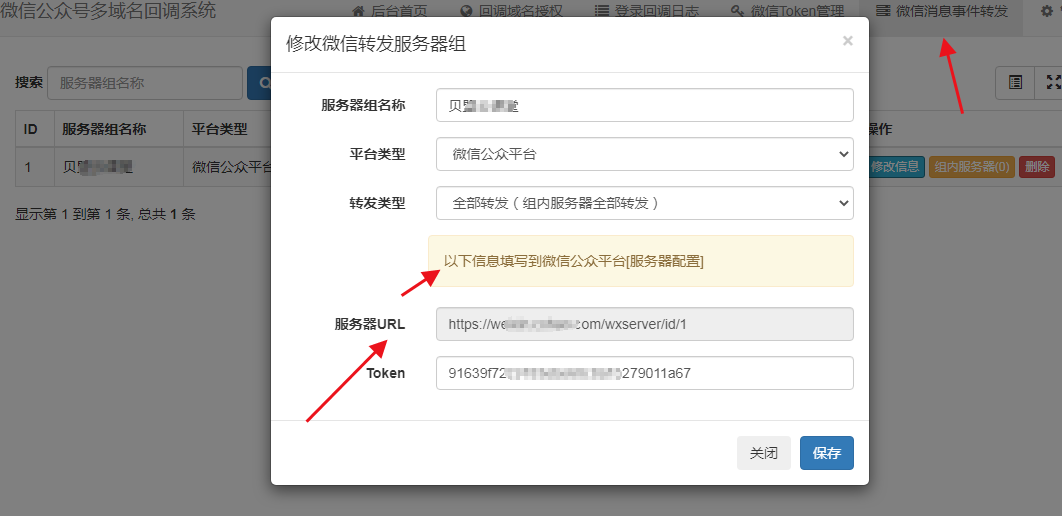
3、微信消息事件转发功能:微信公众平台/企业微信的服务器设置只能填写1个url,用本系统可以同时转发给多个url。如用户关注事件、用户发送的消息等,可以同时发送给多个服务器站点。
4、 支付宝开放平台多域名回调功能:每个支付宝开发平台应用只能配置1个授权回调域名,用本系统突破这个限制,可同时在多个网站使用同一个支付宝开放平台应用。
该版本是由彩虹提供的免费开源源码,主要用于
-----------------------------------------------------------------
安装测试环境:Nginx 1.22+PHP5.7+MySQL 7.4
1、上传源码至网站目录
2、设置网站运行目录为`public`
3、设置伪静态为`ThinkPHP,伪静态规则
Nginx规则
1 2 3 4 5 6 7 | <div> <div>location / {</div> <div> if (!-e $request_filename){</div> <div> rewrite ^(.*)$ /index.php?s=$1 last; break;</div> <div> }</div> <div>}</div> </div> |
1 2 3 4 5 6 7 8 9 | <div> <div><IfModule mod_rewrite.c></div> <div> Options +FollowSymlinks -Multiviews</div> <div> RewriteEngine On</div> <div> RewriteCond %{REQUEST_FILENAME} !-d</div> <div> RewriteCond %{REQUEST_FILENAME} !-f</div> <div> RewriteRule ^(.*)$ index.php/$1 [QSA,PT,L]</div> <div></IfModule></div> </div> |
4、访问网站会自动跳转到安装页面,根据提示安装完成
5、访问 /admin 进入后台管理
-----------------------------------------------------------------
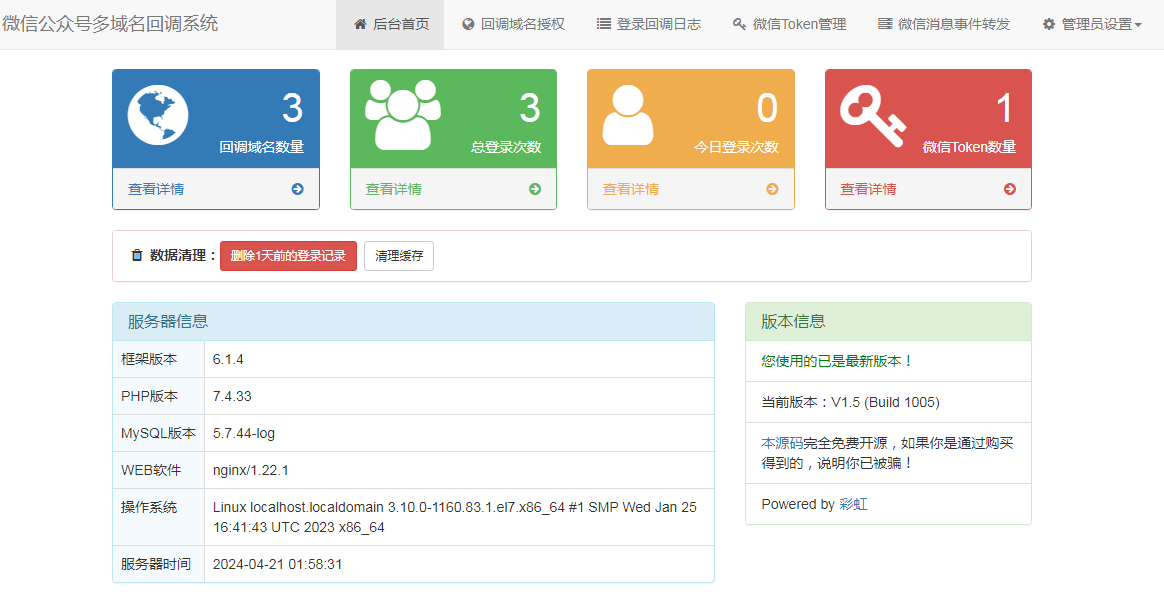 https://img.cxhao.com/2024/04/1713636250-cd462b11c42b686-300x159.png 300w, https://img.cxhao.com/2024/04/1713636250-cd462b11c42b686-1024x542.png 1024w, https://img.cxhao.com/2024/04/1713636250-cd462b11c42b686-255x135.png 255w, https://img.cxhao.com/2024/04/1713636250-cd462b11c42b686-768x406.png 768w" alt="1713636250-cd462b11c42b686" width="1164" height="616" data-mwl-img-id="6491" style="box-sizing: border-box; vertical-align: top; max-width: 100%; height: auto; margin: 0px;"/>
增加回调域名,可查看登陆信息
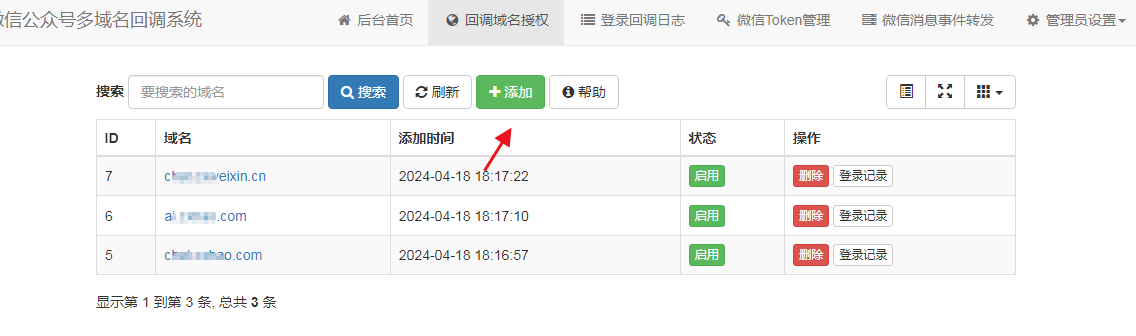 https://img.cxhao.com/2024/04/1713636592-62c6d33d2037dd2-300x89.png 300w, https://img.cxhao.com/2024/04/1713636592-62c6d33d2037dd2-1024x303.png 1024w, https://img.cxhao.com/2024/04/1713636592-62c6d33d2037dd2-255x75.png 255w, https://img.cxhao.com/2024/04/1713636592-62c6d33d2037dd2-768x227.png 768w" alt="1713636592-62c6d33d2037dd2" width="1136" height="336" data-mwl-img-id="6492" style="box-sizing: border-box; vertical-align: top; max-width: 100%; height: auto; margin: 0px;"/>
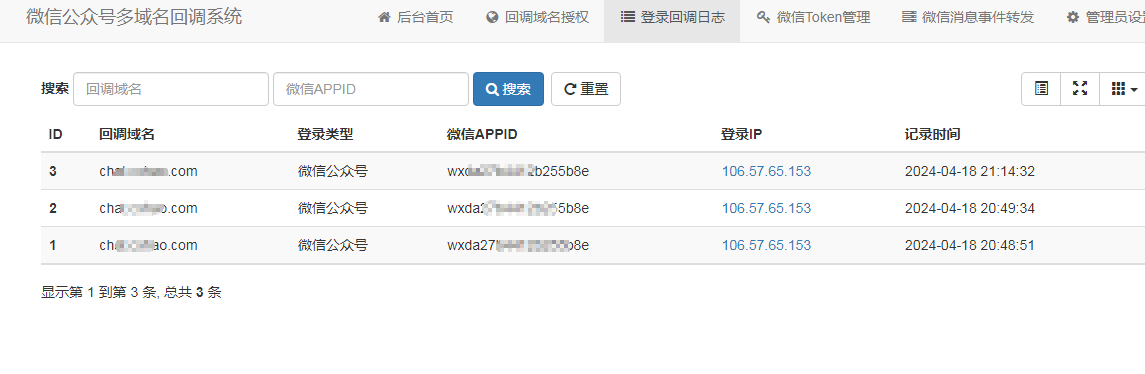 https://img.cxhao.com/2024/04/1713636637-dd496b6cca682a2-300x98.png 300w, https://img.cxhao.com/2024/04/1713636637-dd496b6cca682a2-1024x334.png 1024w, https://img.cxhao.com/2024/04/1713636637-dd496b6cca682a2-255x83.png 255w, https://img.cxhao.com/2024/04/1713636637-dd496b6cca682a2-768x251.png 768w" alt="1713636637-dd496b6cca682a2" width="1145" height="374" data-mwl-img-id="6493" style="box-sizing: border-box; vertical-align: top; max-width: 100%; height: auto; margin: 0px;"/>
这里增加要接入的公众号信息,增加后点测试会提示成功
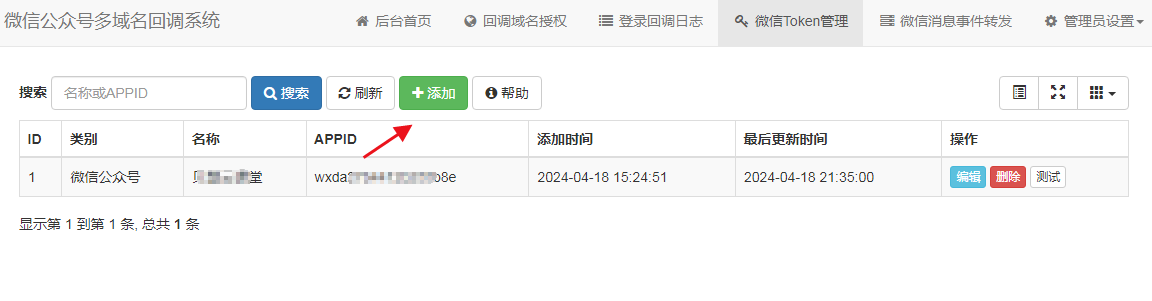 https://img.cxhao.com/2024/04/1713636668-51df9fabb760dd5-300x78.png 300w, https://img.cxhao.com/2024/04/1713636668-51df9fabb760dd5-1024x268.png 1024w, https://img.cxhao.com/2024/04/1713636668-51df9fabb760dd5-255x67.png 255w, https://img.cxhao.com/2024/04/1713636668-51df9fabb760dd5-768x201.png 768w" alt="1713636668-51df9fabb760dd5" width="1152" height="301" data-mwl-img-id="6494" style="box-sizing: border-box; vertical-align: top; max-width: 100%; height: auto; margin: 0px;"/>
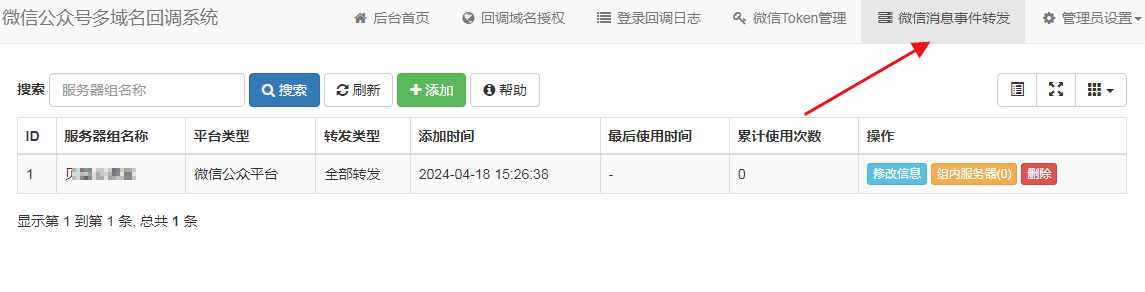
这里的消息事件,相当于比如登陆后会把各种平台的自动回复全部转发至公众号里,如果用不到可以不打开
 https://img.cxhao.com/2024/04/1713636919-b3b1cc089b69c8e-300x77.png 300w, https://img.cxhao.com/2024/04/1713636919-b3b1cc089b69c8e-1024x261.png 1024w, https://img.cxhao.com/2024/04/1713636919-b3b1cc089b69c8e-255x65.png 255w, https://img.cxhao.com/2024/04/1713636919-b3b1cc089b69c8e-768x196.png 768w" alt="1713636919-b3b1cc089b69c8e" width="1145" height="292" data-mwl-img-id="6497" style="box-sizing: border-box; vertical-align: top; max-width: 100%; height: auto; margin: 0px;"/>
多平台接入使用方法
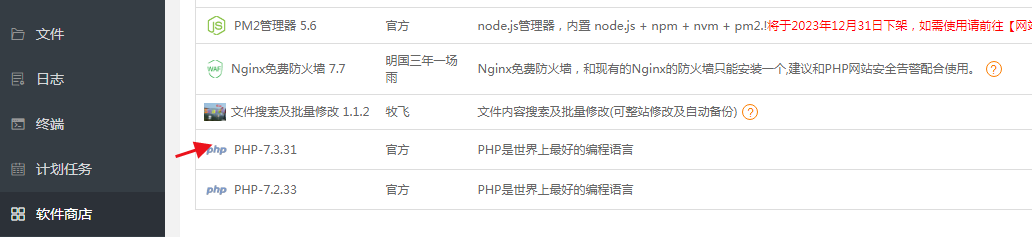
将业务代码中的https://open.weixin.qq.com替换成https://你的网址,可通过宝塔文件搜索及批量修改功能修改
注意备份网站目录,如果修改后有问题可以改回来或者恢复
 https://img.cxhao.com/2024/04/1713637155-01fc2c96c0e903a-300x69.png 300w, https://img.cxhao.com/2024/04/1713637155-01fc2c96c0e903a-1024x235.png 1024w, https://img.cxhao.com/2024/04/1713637155-01fc2c96c0e903a-255x59.png 255w, https://img.cxhao.com/2024/04/1713637155-01fc2c96c0e903a-768x176.png 768w" alt="1713637155-01fc2c96c0e903a" width="1032" height="237" data-mwl-img-id="6498" style="box-sizing: border-box; vertical-align: top; max-width: 100%; height: auto; margin: 0px;"/>
修改的地方涉及两处
1、将业务代码中的https://open.weixin.qq.com替换成https://你的网址
2、公众号/小程序/开放平台是将业务代码中的https://api.weixin.qq.com/cgi-bin/token替换成https://你的网址/token
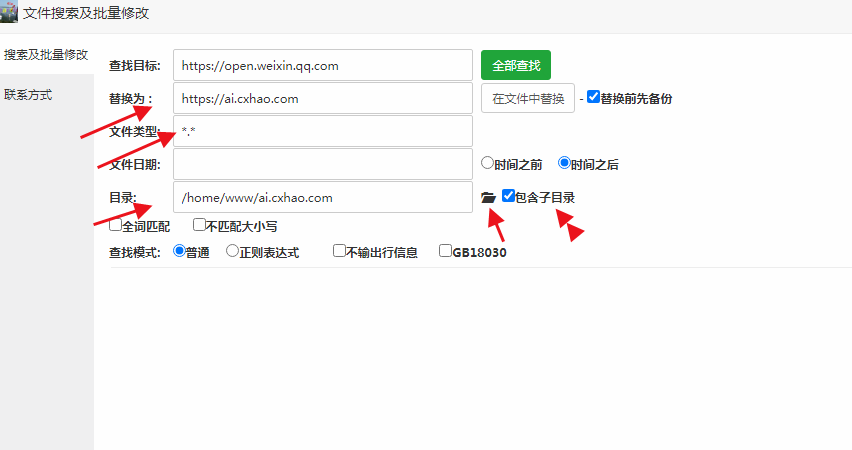
文件类型*.* 目录打开选择要修改的网站目录,包含子目录勾打上
 https://img.cxhao.com/2024/04/1713637329-106b076bf5e5d0e-300x158.png 300w, https://img.cxhao.com/2024/04/1713637329-106b076bf5e5d0e-255x135.png 255w, https://img.cxhao.com/2024/04/1713637329-106b076bf5e5d0e-768x406.png 768w" alt="1713637329-106b076bf5e5d0e" width="852" height="450" data-mwl-img-id="6499" style="box-sizing: border-box; vertical-align: top; max-width: 100%; height: auto; margin: 0px;"/>
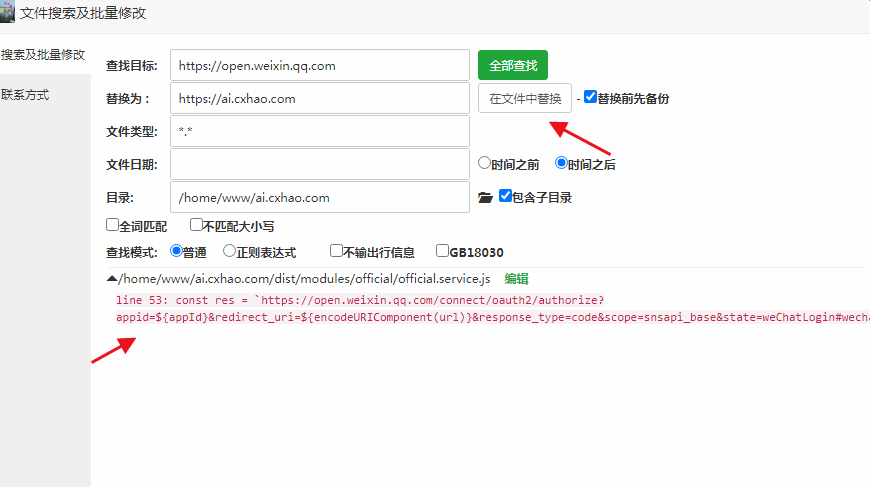
全部查找 ,查找到文件选择在文件中替换
 https://img.cxhao.com/2024/04/1713637381-b0ceac3bacb5956-300x168.png 300w, https://img.cxhao.com/2024/04/1713637381-b0ceac3bacb5956-255x143.png 255w, https://img.cxhao.com/2024/04/1713637381-b0ceac3bacb5956-768x430.png 768w" alt="1713637381-b0ceac3bacb5956" width="870" height="487" data-mwl-img-id="6500" style="box-sizing: border-box; vertical-align: top; max-width: 100%; height: auto; margin: 0px;"/>
https://api.weixin.qq.com/cgi-bin/token修改的方便同上一样把替换网址换成https://你的网址/token
更新后测试,微信公众号后台多域名回调的网址,即安装回调系统的网址,开发者也没具体使用说明供参考,唯一在消息事件转发有个服务器接口,可以填在微信公众号后台测试,经测试并不成功可参考
 https://img.cxhao.com/2024/04/1713637605-18c445de2640159-300x146.png 300w, https://img.cxhao.com/2024/04/1713637605-18c445de2640159-1024x498.png 1024w, https://img.cxhao.com/2024/04/1713637605-18c445de2640159-255x124.png 255w, https://img.cxhao.com/2024/04/1713637605-18c445de2640159-768x373.png 768w" alt="1713637605-18c445de2640159" width="1062" height="516" data-mwl-img-id="6501" style="box-sizing: border-box; vertical-align: top; max-width: 100%; height: auto; margin: 0px;"/>
下载地址:
 渝公网安备50022202000470
渝ICP备2023013153号-1 Powered by qibosoft X1.0 Code ©2003-2020
渝公网安备50022202000470
渝ICP备2023013153号-1 Powered by qibosoft X1.0 Code ©2003-2020
 网络攻城狮
网络攻城狮